 Bitcoin Canvas
The Bitcoin Canvas field guide · 03
Why Bitcoin prices differ between apps and exchanges
One asset. Several kinds of price.
Your tracker shows one Bitcoin price, an exchange shows another, and the buy screen shows a third. That can happen without any of the screens being broken. The first question is what each number represents.
Which price are you looking at?
A chart might show the most recent trade on one venue, a midpoint between buyers and sellers, or an index built from several markets. A buy preview describes an offer for a particular amount and payment method. A completed trade tells you what actually happened.
| Screen | Useful for | Does not promise |
|---|---|---|
| Chart or tracker | Following market movement | A trade at the displayed price |
| Order preview | Reviewing a proposed purchase | That an expired quote remains available |
| Trade receipt | Checking the executed amount and charges | The price of the next trade |
When a tracker multiplies your recorded holdings by a market price, the result is a valuation estimate. It is not necessarily the cash you would receive after selling and withdrawing. The portfolio tracker definition explains that distinction.
Why can two exchanges disagree?
Different venues have different orders from buyers and sellers. A market order trades against the liquidity available on that venue. The best available price may cover only part of a large order, with the rest filled at other prices. Coinbase’s matching-engine documentation shows how one venue matches orders.
The bid is what a buyer currently offers; the ask is what a seller requests. Their difference is the bid–ask spread. A provider can also include a spread in a retail quote. Read the provider’s definition rather than assuming every use of “spread” means exactly the same charge.
Arbitrage can encourage prices to converge, but transfers, trading costs, access restrictions and execution risk prevent it from being an instant, cost-free process. Seeing a gap between two screenshots does not prove a profitable trade is available.
Compare the BTC received for the same spend.
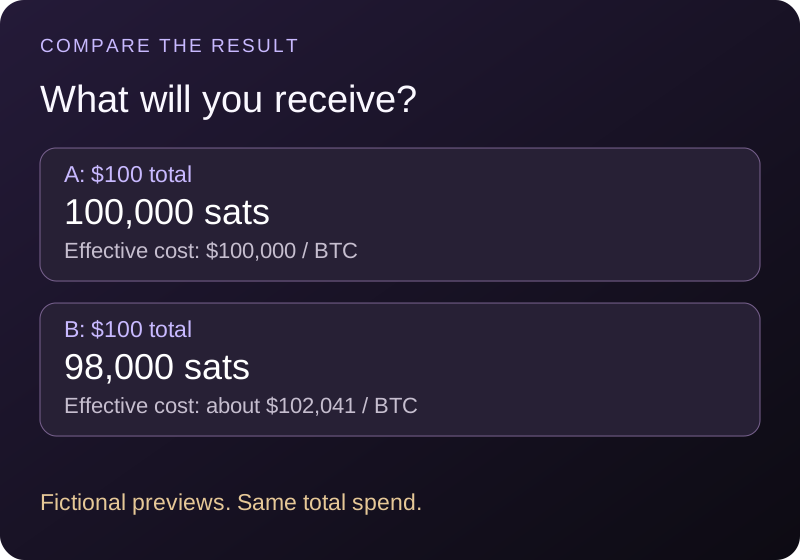
Here is a fictional comparison. Both previews use the same currency, time and total budget. Neither represents a current provider quote.
| Preview | Total charged | BTC received | Effective cost per BTC |
|---|---|---|---|
| A | $100 | 0.00100000 | $100,000 |
| B | $100 | 0.00098000 | About $102,041 |
The calculation is total purchase cost ÷ BTC received. Preview B delivers 2,000 fewer sats for the same $100. That comparison captures a charge embedded in the quote as well as one displayed separately, provided both totals include all purchase charges.
If the goal is bitcoin in an external wallet, also compare the amount that will arrive there. Withdrawal charges, minimums and network availability can change the result. Keep the network fee and the service’s withdrawal charge separate in your notes.
A five-point check before calling a price wrong.
- Match the pair. BTC/USD, BTC/EUR and BTC/USDT are different markets. A stablecoin quote is not automatically the same as a bank-dollar quote.
- Match the moment. Compare timestamps and refresh behavior. A cached chart and a fresh quote may describe different moments.
- Match the action. A buy price, sell price and latest trade are different measurements.
- Match the size and payment method. Review both previews for the same intended order. A larger order or different funding method may change pricing.
- Read the final totals. Record total charged, BTC received and any later withdrawal costs. A headline “zero fee” does not by itself establish the cheapest total.
For a concrete provider example, Coinbase explains spreads and fees and directs users to review the trade preview. This is an illustration of the distinction, not an endorsement or a price comparison between named services.
Market and limit orders answer different priorities.
A market order prioritizes execution against available orders. The final average price can differ from the last traded price you saw. That difference is often called slippage.
A limit order sets a price boundary: a buy limit will not execute above the limit, and a sell limit will not execute below it. It may fill partly or not at all. Setting a limit does not remove service fees, and a limit order that immediately matches available orders is not necessarily treated as a maker order.
For reading a chart, focus on a consistent source and timestamp. For evaluating a proposed transaction, focus on the actual order preview and terms. Those are different tasks, so it is reasonable for the screens to contain different numbers.
The price and chart in the app come from one exchange at a time, Coinbase by default, and you can switch the source in settings. If the app and your exchange disagree, check that both are showing the same exchange and the same pair before assuming either is wrong.
Common questions
Which Bitcoin price is the real one?
A price needs a definition: a trade on a venue, a bid, an ask, an index or a quote for your order. For a completed purchase, the receipt records what you paid and received.
Does a price difference mean my BTC balance changed?
No. A price change alters the displayed currency value. It does not itself change the number of sats you hold.
Is the exchange with the lowest chart price always cheapest?
No. Compare the executable offer for your order, including charges and the amount received. A chart alone cannot answer that question.
Sources & editorial notes
Written by Bitcoin Canvas. Updated October 2, 2026. Diagrams and numerical examples are original teaching aids, not live quotes or recommendations to transact. Wallet features, service charges and recovery procedures can change; check the documentation for your exact setup.
Something unclear? Send a correction or suggest an improvement.
Back to the top ↑