 Bitcoin Canvas
The app shortlist · Reviewed October 9, 2026
Best crypto tracking apps.
Start with what you need.
A price, a portfolio and an explanation are three different things. Here’s how Bitcoin Canvas and five established alternatives approach them—and which one deserves a place on your phone.
Published by Bitcoin Canvas. We list our app first and explain where it fits—and where another app fits better. This is a comparison of official product information, not a hands-on benchmark or independent ranking. Features and plans reviewed October 9, 2026.
What are you opening the app to do?
Choose your main task to jump to an app. This is a shortlist by use case, not a scored league table.
The quick comparison
“Best” depends on the job. Start here, then read the details before choosing.
| App | Best fit in this guide | Check before choosing |
|---|---|---|
| Bitcoin Canvas | Understanding Bitcoin | Bitcoin-only scope; Pro for Penny |
| CoinGecko | Exploring the crypto market | Research and portfolio workflow for your assets |
| CoinMarketCap | Comparing market data | Support for your preferred portfolio connection |
| CoinStats | Connecting crypto portfolios | Integrations, history and plan limits |
| Delta | Stocks and crypto together | Supported accounts and asset allowances |
| CoinTracker | Portfolio records and taxes | Country coverage, records and paid reporting |
01 / Understanding Bitcoin · Our app
Bitcoin Canvas
“What moved Bitcoin—and what am I looking at?”
Bitcoin Canvas combines Bitcoin tracking with explanations. Penny, the AI analyst, answers questions with market context; briefs and dashboards bring price, macro conditions, ETF activity and the network into one Bitcoin-focused experience.
How you might use it
Start with the daily brief, look at the part of the market that changed, then ask a follow-up question. If a chart or term is unfamiliar, use the learning material before going deeper. You can track your Bitcoin exposure without turning every visit into a search across hundreds of tokens.
Where it stands out
- A focused place for Bitcoin market context, holdings and learning.
- Read or listen to briefs; ask Penny follow-up questions.
- Look beyond price at macro, ETF, network and adoption data.
The trade-off. Choose another tool if your main task is a multi-coin portfolio, a combined stock-and-crypto view, or tax reporting. Bitcoin Canvas does not execute trades. Explanations are educational, not predictions or investment advice.
Free or paid?
Free to download on iOS and Android. Pro adds Penny; check the app for current subscription pricing.
Official sources: Bitcoin Canvas features and plans · App Store listing
Explore Bitcoin Canvas features ↗ Link to this section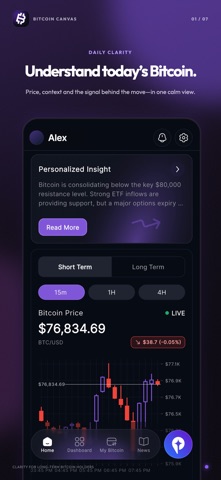
02 / Exploring the crypto market
CoinGecko
“Which coins, categories and markets should I research?”
CoinGecko is a strong starting point for exploring crypto assets, categories and market data. Its portfolio tools sit alongside that research experience, so a watchlist can lead naturally into a closer look at an asset.
How you might use it
Use it to compare assets before adding them to a watchlist or portfolio. When you see a token mentioned elsewhere, checking its market data and category is a different job from asking why Bitcoin moved today. CoinGecko is especially relevant when your curiosity extends well beyond Bitcoin.
Where it stands out
- Broad crypto market discovery and asset research.
- Portfolio tracking, watchlists, alerts and mobile widgets.
- Web and mobile access for checking the market in different settings.
The trade-off. Breadth is the reason to choose it. If you mainly want a regular Bitcoin briefing and a guided explanation of Bitcoin data, compare that workflow with Bitcoin Canvas rather than counting the number of listed assets.
Free or paid?
CoinGecko describes its portfolio tracker as free. Check its current offerings for any optional paid services.
Official sources: CoinGecko portfolio features · CoinGecko mobile app · App Store listing
Bitcoin Canvas vs CoinGecko Link to this section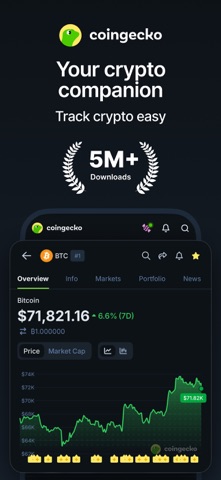
03 / Comparing market data
CoinMarketCap
“How does this coin compare with the rest of the market?”
CoinMarketCap brings rankings, prices, market capitalization, volume and watchlists into a broad market view. It is a useful candidate when comparison across coins is the main reason you open a tracker.
How you might use it
Start with the market overview, compare an asset with its peers, then follow the coins that matter to you. Its portfolio offering supports manual transactions as well as advertised wallet and Binance account sync options. Check the supported connection before assuming your particular account is covered.
Where it stands out
- Market-wide rankings and coin comparisons.
- Watchlists, price alerts and portfolio tools.
- News and community content alongside market information.
The trade-off. A market-ranking view and a Bitcoin explanation workflow answer different questions. Bitcoin Canvas is the narrower choice for Bitcoin context; CoinMarketCap is the broader choice for comparing crypto assets. Neither a ranking nor a market explanation tells you what to buy.
Free or paid?
CoinMarketCap advertises its portfolio tracker as free. An account is needed to use and synchronize the portfolio.
Official sources: CoinMarketCap portfolio features · CoinMarketCap mobile app · App Store listing
Bitcoin Canvas vs CoinMarketCap Link to this section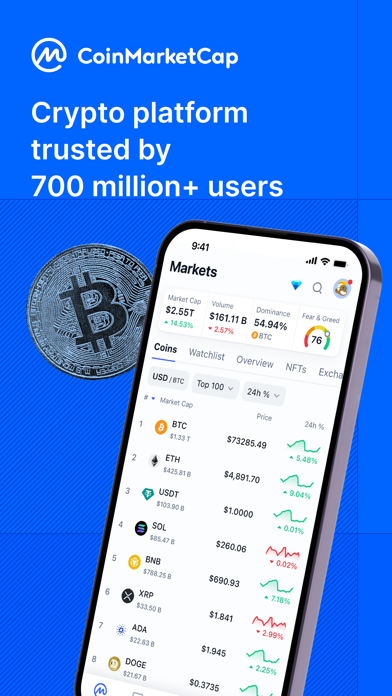
04 / Connecting crypto portfolios
CoinStats
“What do I hold across my wallets and exchanges?”
CoinStats is a strong candidate for people whose crypto is spread across wallets, exchanges and chains. Connected portfolios and performance analysis are central to its offering, alongside DeFi and NFT coverage.
How you might use it
Begin with your actual accounts and check whether the required integrations are supported. Once connected, review holdings and profit-and-loss data together. CoinStats also advertises AI insights, so the fair comparison with Bitcoin Canvas is breadth and workflow—not AI versus no AI.
Where it stands out
- Wallet and exchange connections, plus manual portfolios.
- Portfolio performance, allocation and profit-and-loss tools.
- DeFi and NFT coverage for a wider crypto holdings picture.
The trade-off. Check plan limits, supported networks and the history imported for your accounts. Bitcoin Canvas makes more sense when Bitcoin understanding is the priority; it is not a substitute for a complex connected crypto portfolio.
Free or paid?
A free Basic plan and paid plans are available. Connection capacity and advanced analytics depend on the plan; check the current pricing page.
Official sources: CoinStats product overview · CoinStats plans · App Store listing
Bitcoin Canvas vs CoinStats Link to this section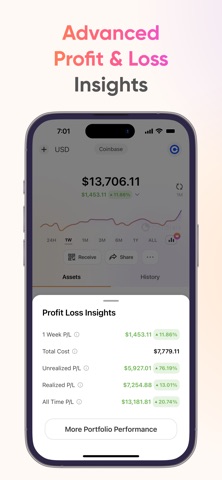
05 / Stocks and crypto together
Delta
“How does crypto fit into my wider investment portfolio?”
Delta by eToro tracks a mix of investments, including crypto, stocks and ETFs. That makes it a relevant option when the important comparison is between asset classes rather than between Bitcoin apps.
How you might use it
Look at your combined holdings, then investigate the asset or allocation that changed. Delta offers account connections, portfolio analytics and AI features. Its appeal is the ability to put crypto alongside other investments instead of treating it as a separate universe.
Where it stands out
- A portfolio view spanning crypto and traditional investments.
- Connections to supported brokers, exchanges and wallets.
- Analytics and market explanations, with features varying by tier.
The trade-off. Check asset allowances and feature access on Basic, PRO and PRO+. Delta is the better candidate for a mixed portfolio; Bitcoin Canvas is the narrower candidate for a dedicated Bitcoin learning and market-context routine.
Free or paid?
Basic is free, with paid PRO and PRO+ tiers. Asset limits and AI allowances vary; verify the current regional offer before subscribing.
Official sources: Delta features and plans · App Store listing
Bitcoin Canvas vs Delta Link to this section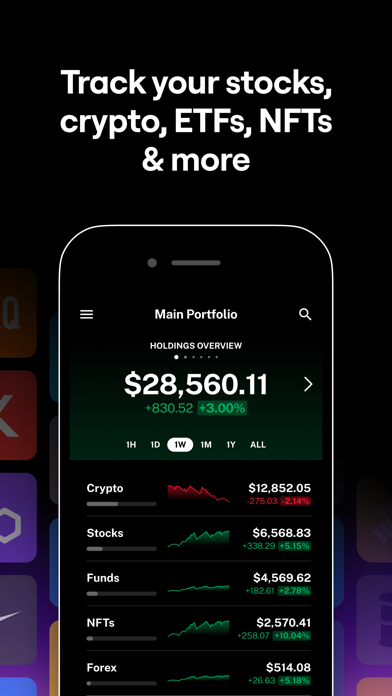
06 / Portfolio records and taxes
CoinTracker
“Can I organize my crypto transactions for tax reporting?”
CoinTracker combines portfolio tracking with transaction records and tax-reporting tools. It belongs on this shortlist because a price chart alone does not solve the recordkeeping work that comes with a crypto transaction history.
How you might use it
Connect supported accounts or import records, review the transaction history and resolve missing or inconsistent entries. Tax outputs are a separate task from checking today’s balance. Confirm support for your jurisdiction and transaction types before purchasing a reporting plan.
Where it stands out
- Portfolio and transaction history in one workflow.
- Account connections and CSV imports.
- Paid tax-reporting plans and integrations with filing software.
The trade-off. Bitcoin Canvas is not tax software and should not replace CoinTracker’s records or reporting workflow. Choose Canvas for Bitcoin context; consider CoinTracker when records and tax preparation are the unresolved job.
Free or paid?
Free portfolio-value and tax-summary access; downloadable tax forms require a paid plan. The US pricing page lists Base from $59/year for up to 100 transactions as reviewed on October 9, 2026. Country, transaction count and features affect the suitable plan.
Official sources: CoinTracker portfolio features · CoinTracker pricing and reporting limits · App Store listing
Bitcoin Canvas vs CoinTracker Link to this section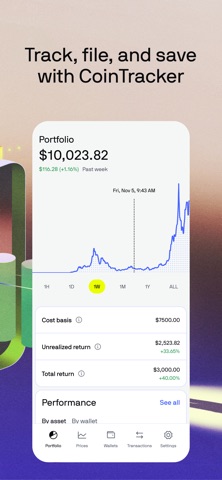
Before you install everything
Choose with one real task.
A feature list can make every app sound like a fit. A small, repeatable task is a better test. These are suggested checks, not results from testing the apps ourselves.
- Write down your question. Is it “what happened to Bitcoin,” “what do I own,” or “where are my transaction records”? Start with the app designed around that task.
- Try your actual situation. Use an asset you follow, an account you need supported or a term you want explained. A demo chart cannot tell you whether your particular workflow is covered.
- Check the full cost. A free download is not the same as free access to every feature. Check the subscription term, account or asset limits, and any reporting charges before subscribing.
- Keep what already works. You might use a broad tracker for holdings and Bitcoin Canvas for understanding. There is no need to move everything just to try a different learning experience.
If you are still learning the basics, our Bitcoin glossary connects the terms. Our wallet guide explains the difference between tracking coins and controlling them.
How we put this guide together
We selected five established alternatives with different jobs: market discovery, market comparison, connected crypto portfolios, mixed investments, and tax records. This is not an exhaustive list or a claim that these are the five most downloaded apps.
We reviewed official product pages, plan information and US App Store listings on October 9, 2026. The images are publisher-provided store screenshots, not screenshots from our own accounts. Any figures or promotional claims inside those images belong to their publishers and are not independently verified here.
Our recommendations are editorial judgments about fit. We have not benchmarked price accuracy, sync reliability, security or AI answers. Features can differ across platforms, countries and plans. Follow the official links in each section to check the offer that applies to you.
We publish Bitcoin Canvas, so we have a commercial interest in readers trying it. We put it first for transparency about the perspective of this guide; we do not award it a universal “best overall” score. App names and screenshots belong to their respective owners. Their inclusion does not imply endorsement.
A few useful distinctions
What is the best free crypto tracking app?
It depends on the task. CoinGecko and CoinMarketCap advertise free portfolio tools. CoinStats, Delta and CoinTracker offer free entry points with different paid features. Bitcoin Canvas is free to download, with Pro for Penny. Check the feature you actually need, rather than using the download price as the comparison.
Is a crypto tracker the same as a wallet?
No. Tracking shows information about holdings; a wallet manages the keys used to authorize transactions. Some products combine several functions, so check what permissions a particular connection requests. You do not need to transfer coins simply to try Bitcoin Canvas.
Does Bitcoin Canvas track every cryptocurrency?
No. It focuses on Bitcoin. If you need many tokens or a stock-and-crypto portfolio, use the corresponding alternatives in this guide.
Can I use two tracking apps together?
Yes. You might keep a broad portfolio tracker for your holdings and use Bitcoin Canvas to understand Bitcoin. Start with the problem your current app does not solve, then check whether a second app earns its place in your routine.
For the Bitcoin-curious
Go beyond checking the price.
Read the brief, explore the data and start understanding Bitcoin with Bitcoin Canvas. Free to download; Pro adds Penny.
Explore features and plans