 Bitcoin Canvas
Two apps, one decision · Reviewed October 9, 2026
Bitcoin Canvas
vs CoinStats
Choose CoinStats when combining crypto accounts and analyzing portfolio performance is your main task. Choose Bitcoin Canvas when you want a focused way to understand Bitcoin. CoinStats has AI features too; the distinction is the experience around the question, not the presence of an AI label.
Published by Bitcoin Canvas. We list our app first and explain where it fits—and where another app fits better. This is a comparison of official product information, not a hands-on benchmark or independent ranking. Features and plans reviewed October 9, 2026.
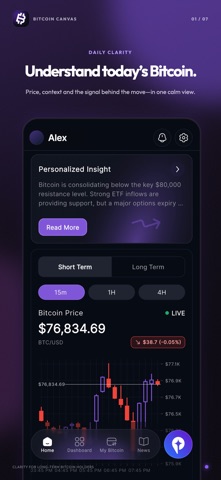
Bitcoin Canvas
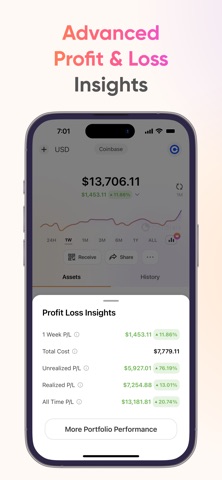
CoinStats
Jump to CoinStats in the full six-app guide ↗
The difference that matters
Imagine holding Bitcoin on an exchange, other assets in two wallets, and a DeFi position. Before asking why the market moved, you may need to establish what you own and whether every position appears correctly. That is a different starting point from following Bitcoin alone.
| Consideration | Bitcoin Canvas | CoinStats |
|---|---|---|
| Core focus | Bitcoin context and learning | Connected crypto portfolio analysis |
| Holdings breadth | Bitcoin | Multiple crypto assets, DeFi and NFTs |
| AI distinction | Penny within a Bitcoin-focused app | AI insights within a broader portfolio app |
| Best evaluation | Can I understand the Bitcoin story? | Can I see and analyze my actual positions? |
When CoinStats is the better fit
CoinStats is designed around that wider portfolio picture. Check integrations, connect supported accounts, then inspect allocation and performance. Its product documentation also describes manual portfolios and DeFi and NFT coverage. If connected holdings are your priority, evaluate those capabilities before choosing an app for its market commentary.
Official sources: CoinStats product overview · CoinStats plans · App Store listing
When Bitcoin Canvas is the better fit
Canvas keeps the scope on Bitcoin: what is happening in the market, which data might help explain it, and what unfamiliar terms mean. Penny and the brief are part of that learning routine. This can complement a portfolio aggregator, but it does not turn Canvas into a replacement for every chain, position type or analytics workflow.
Official sources: Bitcoin Canvas features and plans · App Store listing
Compare the cost of your actual task
Bitcoin Canvas. Free to download on iOS and Android. Pro adds Penny; check the app for current subscription pricing.
CoinStats. A free Basic plan and paid plans are available. Connection capacity and advanced analytics depend on the plan; check the current pricing page.
Compare what you will use over the same subscription period. An app that is free to install may charge for the feature that brought you to it. A paid feature you never use is not a reason to choose a more expensive plan.
Official sources: CoinStats product overview · CoinStats plans · App Store listing
Before you switch—or add a second app
Keep an established CoinStats setup while checking whether Canvas adds useful Bitcoin context. If you later change your main tracker, retain your transaction records and compare balances and history before relying on a new view. A successful connection alone is not a complete reconciliation.
- List your required exchanges, chains and position types before comparing plans.
- Check whether the analytics you need are available on the plan you intend to use.
- Try the same Bitcoin question in both apps and compare usefulness and source clarity, not just answer length.
These are suggested evaluation steps, not findings from hands-on testing. The screenshots above are official promotional images and may show paid features. We reviewed product information on October 9, 2026; check the linked sources for current availability.
Choose the job you need done
Choose CoinStats if your priority is connecting crypto portfolios. Choose Bitcoin Canvas if your priority is understanding Bitcoin. If both jobs matter, try them together before replacing an existing setup.
For terminology along the way, keep our Bitcoin glossary nearby.
For the Bitcoin-curious
Go beyond checking the price.
Read the brief, explore the data and start understanding Bitcoin with Bitcoin Canvas. Free to download; Pro adds Penny.
Explore features and plans